
Key Takeaways
-
The average cost to automate a home ranges from $100 to $10,000, with many homeowners spending around $820.
-
Brand selection can significantly influence the overall cost of your smart home system.
-
Opting for DIY installation can save money, but professional installation ensures reliability and integration.
-
Starting with essential smart devices can keep initial costs down while providing significant convenience.
-
Long-term savings from energy efficiency and home security can offset the initial investment in smart home technology.
The Core Costs of Smart Home Conversion
Embarking on the journey to transform your home into a smart one is exciting. The idea of controlling your lights, temperature, and security with a simple voice command or a tap on your smartphone is not only convenient but also incredibly cool. But before diving in, it’s crucial to understand the financial commitment you’re about to make. Generally, the cost of converting to a smart home can be as low as $100 for a couple of smart bulbs or upwards of $10,000 for a comprehensive, fully integrated system. The good news is, there’s a smart home solution for nearly every budget.
Most importantly, you need to know that the bulk of your investment will go into purchasing the devices themselves. Whether it’s smart cameras, thermostats, lighting, or door locks, the hardware is the foundation of your smart home. But remember, these are more than just gadgets; they’re an investment in your home’s efficiency, security, and your own lifestyle convenience.
The Main Financial Players in Automating Your Home
When planning your smart home budget, consider the main categories that will affect your bottom line:
-
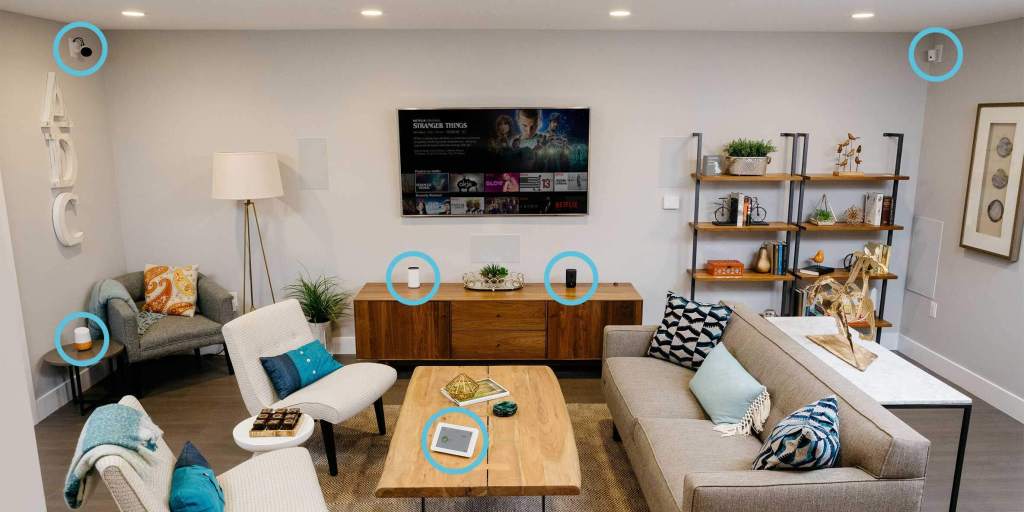
Smart Devices: This includes everything from smart speakers and displays to thermostats, lights, locks, and cameras.
-
Control Systems: These are the hubs or software that integrate various smart devices and allow them to work together seamlessly.
-
Installation: Depending on your skill level and the complexity of your system, you may need professional help to get everything up and running.
Each category has a range of options, from budget-friendly to high-end. And while it’s tempting to go for the latest and greatest, it’s important to assess what you truly need and what will bring the most value to your life.
|
Device Type |
Company |
Description |
|---|---|---|
|
Smart Speakers |
Amazon (Echo Dot), Google (Nest Mini) |
Voice-controlled speakers with built-in assistants for voice commands and music playback |
|
Smart Displays |
Amazon (Echo Show 5), Google (Nest Hub) |
Combines the functionality of a smart speaker with a touch screen for controlling smart home devices and displaying information |
|
Smart Lighting |
Philips Hue |
Smart LED light bulbs and lighting systems that can be controlled via a smartphone app or voice commands |
|
Smart Thermostat |
Nest |
A smart thermostat that learns your preferences and can be controlled remotely |
|
Smart Plug |
Aqara U100 |
A smart plug that can be controlled via a smartphone app or voice commands, allowing you to turn electronics on or off remotely |
|
Smart Lock |
Aqara |
A smart lock that can be controlled via a smartphone app or voice commands, allowing you to lock or unlock your door remotely |
|
Smart Baby Monitor |
Nanit Pro |
A smart baby monitor with advanced features like sleep tracking and alerts for breathing issues |
|
Smart Air Conditioner |
GE |
A smart air conditioner that can be controlled via a smartphone app or voice commands |
|
Smart Air Purifier |
Dyson |
A smart air purifier that can be controlled via a smartphone app or voice commands |
|
Smart Bed |
Eight Sleep |
A smart bed that can be controlled via a smartphone app or voice commands, offering features like sleep tracking and adjustable temperature |
|
Smart Security Camera |
Nest Cam |
A smart security camera that can be controlled via a smartphone app or voice commands, allowing you to monitor your home remotely |
|
Smart Home Hub |
Samsung SmartThings Station |
A smart home hub that can control multiple smart devices and works with various voice assistants |
On a Budget: Smart Home Essentials
If your pockets aren’t deep, start with the essentials. A few well-chosen devices can offer you a taste of the smart home experience without a hefty price tag. Here’s what I suggest for a basic setup:
-
A smart speaker or display for voice control and smart home management.
-
Smart bulbs or plugs to control lighting and small appliances remotely.
-
A smart thermostat to save on heating and cooling costs.
This basic setup can often be achieved for a few hundred dollars and will still provide a significant upgrade to your daily routine. Plus, these devices typically don’t require professional installation, which means you can save on costs there too.
Installation: DIY vs. Professional Services
When it comes to installation, you’re faced with a choice: roll up your sleeves and do it yourself, or hire a pro. DIY installation can save you a pretty penny, especially if you’re tech-savvy and enjoy a good weekend project. However, professional installation guarantees that your system is set up correctly and is often worth the extra cost for the peace of mind it brings. A professional can also help you integrate different devices, ensuring they work together smoothly.

Blueprinting Your Smart Home System
Before purchasing any smart home devices, it’s crucial to plan your system. This blueprint should be your roadmap to purchasing and installing the right tech for your home. Think about what aspects of your home life you want to streamline or secure. Do you want to focus on energy efficiency, security, or convenience? Maybe all three? Your goals will determine the devices you choose and the complexity of your system.
Mapping Out Your Tech Terrain
Start with a list of the devices you want to include in your smart home system. Then, think about how these devices will communicate with each other. Most smart home devices use Wi-Fi, but others might use Bluetooth, Zigbee, or Z-Wave. It’s like putting together a puzzle where all the pieces need to fit together perfectly. If they don’t, you might find yourself with a bunch of smart devices that can’t talk to each other, which is like having a bunch of remote controls with dead batteries.
Therefore, your blueprint should include a central hub or a control system that can manage all your devices. This hub acts as the brain of your smart home, and without it, you won’t get the full smart home experience. It allows for routines and automations that can make your life significantly easier.
Integrating Systems for Seamless Functionality
Once you’ve mapped out your tech terrain, the next step is integration. This means making sure all your devices work together to create a cohesive system. It’s not just about having smart devices; it’s about having a smart system. This is where a professional installer can be invaluable, especially if your system involves complex setups or wiring.
Integration also extends to software. Most smart home devices have their own apps, but for a truly integrated experience, you want to control everything from one place. This could be a manufacturer’s app, like Samsung’s SmartThings, or a third-party app that’s compatible with all your devices.
Trimming Your Smart Home Budget
Smart home technology can be expensive, but there are ways to trim the budget. Start small with the most important devices that will make the biggest impact on your daily life. Look for deals and discounts, especially during holiday sales. And don’t forget to check if the devices you are considering require a monthly subscription, as this can add to the overall cost.
Finding Value Beyond the Sticker Price
Besides the immediate convenience, smart home devices can offer long-term savings. For example, a smart thermostat can reduce your heating and cooling costs by adjusting the temperature based on your habits and preferences. Similarly, smart lighting can save electricity by turning off when no one is in the room. These savings can add up over time and should be factored into your cost considerations.
Making Smart Choices with Long-Term Payoffs
When it comes to smart home automation, think about the future. Investing in high-quality devices from reputable brands might cost more upfront but can save you money and headaches in the long run. These devices are often more reliable, have better security features, and come with better support. Plus, they’re more likely to integrate seamlessly with new devices as your system expands.
Remember, the goal is to simplify your life, not complicate it with devices that don’t work as expected. So, choose wisely, and consider the long-term benefits when making your selections.
For instance, opting for a smart doorbell camera might seem like just a simple convenience, but it adds a layer of security to your home, allowing you to see who’s at the door from anywhere. Over time, this could deter potential burglaries and package thefts, offering not just convenience but peace of mind as well.
How much does it cost to convert to a smart home?
The cost to convert to a smart home varies widely based on the scale and complexity of the system you choose. You could start with a basic setup of a smart speaker, a couple of smart bulbs, and a smart plug for around $200-$300. On the other end of the spectrum, a comprehensive system with a central hub, multiple sensors, cameras, lighting, and high-end devices could run upwards of $10,000. It all boils down to your personal needs, the size of your home, and the level of automation you desire.
What’s the Starting Point for a Smart Home Budget?
Embarking on a smart home project can feel like setting sail in uncharted waters. Your budget’s starting point will depend on the scope of your vision. For a modest beginning, earmarking $200-$300 can get you foundational pieces like a smart speaker, a couple of smart bulbs, and a smart plug. But if your sights are set on a more comprehensive setup, the sky—or your budget’s limit—is the only boundary. Start by considering the essentials and then scale up as your needs and finances allow. For detailed insights on managing your finances for such projects, consider reading our relocation budget planning guide.
Can Smart Home Features Really Save Money in the Long Run?
It’s not just about the cool factor; smart home features are a smart investment too. A smart thermostat alone can shave off a considerable chunk from your energy bill by learning your schedule and adjusting the temperature accordingly. Smart lighting that turns off automatically when rooms are unoccupied can further reduce your utility expenses. In essence, while the upfront cost might be noticeable, the efficiencies gained can lead to tangible savings over time.
Are High-End Smart Home Systems Worth the Investment?
When it comes to high-end smart home systems, you’re not just buying gadgets; you’re investing in an ecosystem. The premium you pay is for the sophistication, reliability, and the seamless integration that these systems offer. And while they do come with a steeper price tag, the enhanced security features, energy management, and convenience they provide can justify the investment, especially if home automation is a long-term commitment for you.
Moreover, top-tier systems often come with superior support and warranties, which means any issues you encounter can be resolved quickly and efficiently, saving you time and potential future costs.
How Do I Choose Between Different Smart Home Brands?
Choosing between smart home brands can be daunting, but the key is to focus on compatibility, reliability, and the specific needs of your home. Start by listing the features that are most important to you—be it energy savings, security, or ease of use. Then, research which brands specialize in these areas. It’s also wise to read reviews and look for systems that play well with others, ensuring that any future smart home additions will integrate smoothly into your existing setup.
For example, if you’re heavily invested in the Apple ecosystem, you might lean towards devices that support HomeKit. Conversely, if you’re an Amazon Echo user, Alexa-compatible devices would be a more natural fit.
Don’t forget to consider the long-term costs associated with each brand, such as subscription fees for cloud services or add-ons. Sometimes a higher initial investment can lead to lower overall costs down the line.

Is It Possible to Upgrade My Existing Home to a Smart Home Gradually?
Absolutely! Upgrading your home to a smart home doesn’t have to be an all-or-nothing affair. You can start small—perhaps with a smart thermostat or a few smart lights—and expand your system as you become more comfortable with the technology and as your budget allows. This piecemeal approach also gives you the flexibility to test different brands and devices to see what works best for you and your lifestyle.
One of the joys of smart home technology is its scalability. You can build your system one device at a time, ensuring each new addition brings value and convenience to your home. By gradually upgrading, you spread out the cost over time, making it more manageable and allowing you to invest in quality devices that will stand the test of time.
In the end, the smart home journey is about enhancing your living experience. With careful planning, a clear understanding of your needs, and a willingness to start small, you can create a smart home that not only simplifies your life but also brings joy and efficiency to your daily routines. So go ahead, take that first step, and enjoy the ride into the future of home living.